How to Set Up the Whitespace Tool in a Sales Template
The Whitespace tool is a special Area type within a Sales Template that gives you a visual grid for tracking product or service coverage across accounts. It is configured directly inside the template editor.
Accessing the Whitespace Tool
Open an editable version of your Sales Template and click Whitespace, located next to the blue Template button in the top left corner.
The Whitespace tool is configured across four tabs: Set Up, Columns, Options, and Detail Fields.
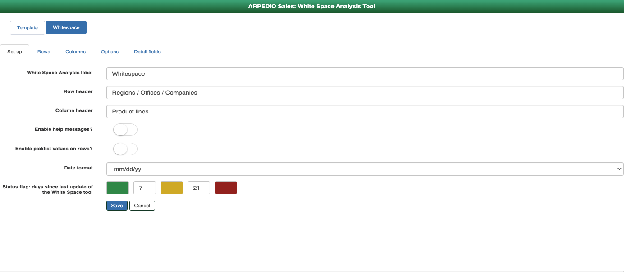
Set Up Tab
The Set Up tab defines the status flag rules for the Whitespace tool. ARPEDIO reads the date of the last update and applies a color status based on how many days have passed:
- Green if the number of days since the last update is less than or equal to the first threshold you define.
- Amber once that threshold is exceeded.
- Red once the number of days reaches the second threshold,
- if no update has been made.
Fill in all fields on this tab and click Save before publishing the Whitespace tool.
Columns Tab
The Columns tab defines the column titles displayed across the top of the Whitespace grid.
Note: It is not currently possible to define different column sets for different account types. All Whitespace tools in your org will display the same columns.
Options Tab
The Options tab defines the values a user can toggle through at each row and column intersection. You can add as many options as needed. One option must be set as the default.
Detail Fields Tab
The Detail Fields tab defines the fields shown in the detail pop-up when a user clicks the Detail button for a row. You can add as many fields as needed and choose from the following field types:
| Field Type | Description |
|---|---|
| Attribute | A dropdown menu of selectable options |
| Note | A free text field, for example for comments |
| Currency Value | A numeric value field, for example commercial opportunity value |
| Percentage Value | A percentage field capped at 100%, for example close probability |
| Date Value | A date range field, for example a close date |
| URL Value | A URL field that can link to an external record such as an Opportunity |
You can mark one or more fields as required, meaning users must complete them before closing the detail screen. For Attribute fields, you define a list of options and must set one as the default.