Understanding the ARPEDIO Sales Heat Map
The ARPEDIO Sales Heat Map is a fully customizable report that gives you a strategic overview of account health and pipeline opportunities, all built on your ARPEDIO data.
Multiple Templates Per Object
Within the Heat Map, you can select between different templates for the same Salesforce object. This means you can publish multiple templates for a single object to support different business contexts. For example, you might have two separate templates for the Account object — one configured for Established Business and another for New Business.
Navigating the Heat Map
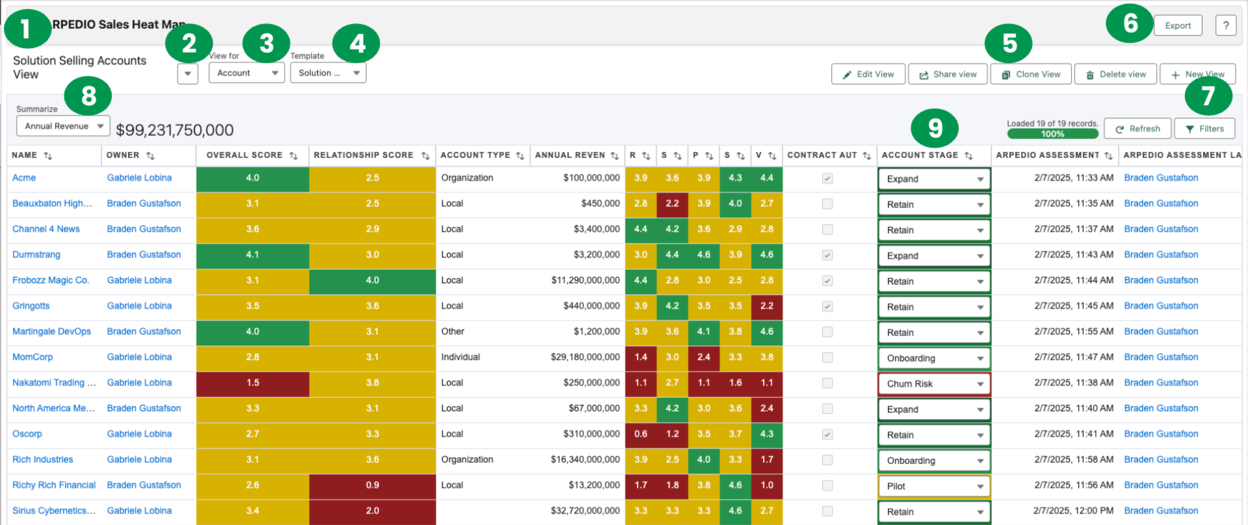
The Heat Map toolbar gives you quick access to all core controls:
- The current View being displayed
- Other Views you have created or that have been shared with you
- The Salesforce object you are viewing
- The sub-template for the selected object
- Edit, Share, Clone, Delete or Create a New Heat Map View
- Export the Heat Map and its data as an Excel file
- Add or edit filters for the current View
- The currency field to be summarized and displayed
- Status fields, configured within the Sales Template
Adding Fields to a View
When creating or editing a View, navigate to the Fields to Include section to configure which fields appear in the Heat Map.
- Use the search bar to quickly find a specific field by name.
- Scroll through the full list of available fields for the selected object, sorted alphabetically.
- Use the horizontal arrows to move a field into the Selected section.
- Use the vertical arrows to adjust the order in which fields appear.
Note: If you are creating a View for Opportunities, you can include the ARPEDIO Probability field, which calculates a probability to close based on your ARPEDIO Opportunity Assessment.
Once you have selected your fields, click Save. Your chosen fields will display within the View.