How to Set Up a Default Template for Account and Opportunity Management
ARPEDIO includes a set of best practice templates you can import directly into the Sales package, giving you a ready-to-use starting point without building from scratch.
Getting Started
- Open the App Launcher in the upper left corner, search for Sales Templates, and select Planning Templates.
- Choose the object you want to assess with ARPEDIO.
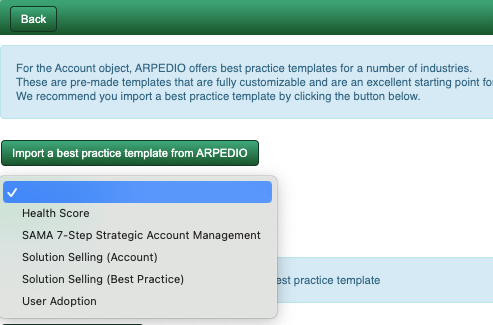
- Click Import a Best Practice Template from ARPEDIO.
- Select the template that best fits your needs from the picklist.
- Click Import Template.
Note: Once imported, the template is saved as Version 1 and published immediately. To make changes, you must create a new version.
Choosing the Right Template
The following best practice templates are available:
- SAMA 7-Step Strategic Account Management — recommended if your organization is a SAMA member and follows the SAMA methodology.
- Solution Selling (Account) — a well-rounded Account Management template suitable for most organizations as a starting point.
Starting from a Blank Template
If none of the best practice templates suit your needs, you can create a blank template instead. Start by creating your first element, then build out your areas, topics, and questions from there.
Making Changes to the Template
To modify an imported template, click Create a New Version in the top right corner of the template editor, make your changes, and publish the new version.
Was this article helpful?