What Happens to Existing Assessments When You Change a Sales Template?
Publishing a new version of a Sales Assessment template will affect assessments that were completed using an earlier version. Understanding these impacts helps you make changes confidently and avoid unintended data issues.
Changing Question, Topic, or Area Text
You can edit the phrasing of:
- Areas.
- Topics
- Questions
Use text edits to clarify meaning without changing it. If you want to change the meaning of a question entirely, create a new question and delete the old one rather than editing the existing text.
Important: If you change the meaning of a question rather than just the wording, existing assessments will display the new text against answers that were given in response to the old question. There is no way to identify which version of the question a user was answering at the time.
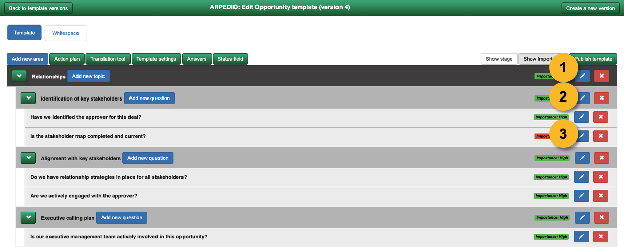
Changing Importance
You can change the importance weighting of a question, topic, or area. Any change will recalculate scores throughout the assessment hierarchy.
For example, changing a question's importance from Low to High increases the weight of that question's answer when calculating the topic score above it. The updated topic score then flows up to the area score, and from there to the overall assessment score.
Note: Importance changes apply immediately to all existing assessments once a new template version is published. Stage is also editable for Opportunity Assessments only.
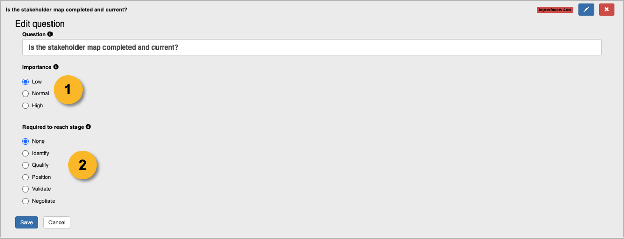
Adding New Elements
Adding a new question, topic, or area to the template causes the following in existing assessments:
- The new element appears as N/A.
- The parent element (topic or area above it) displays as not fully assessed, shown with a grey score background.
You cannot save an area assessment until all questions within its topics have either been answered or set to N/A.
Deleting Elements
Deleting a question, topic, or area changes the relative weights of the remaining elements in the template. ARPEDIO recalculates all affected assessment scores automatically when the new template version is published.
Adding or Deleting Answers
Adding or deleting answer options changes the relative weights of all answers in the template, which in turn updates all assessment scores.
Important: Deleting an answer resets every question that used that answer to N/A across all existing assessments.
