How to Add ARPEDIO Sales Components to a Record Page
Adding ARPEDIO components to your record pages gives you direct access to assessments, account plans, and other ARPEDIO tools without leaving the record. The steps below use the Account page as an example, but the same process applies to all object types.
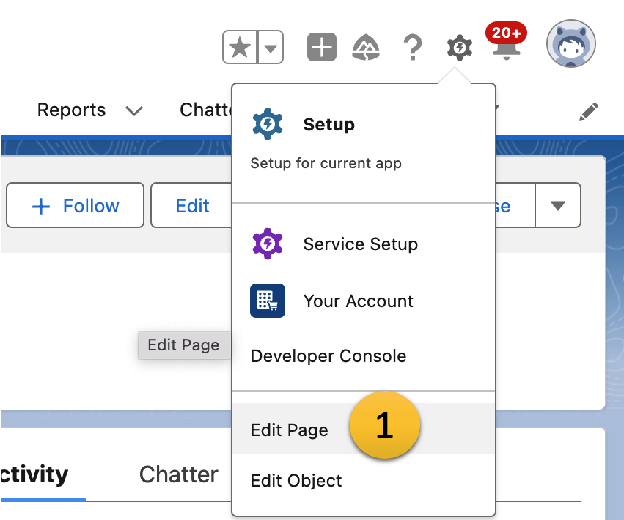
- Open any Account record, click the Gear Icon in the top right corner, and select Edit Page.
- Click Add Tab to create a new tab on the page layout.
- Search from the components list for ‘ARPEDIO’ to locate all available ARPEDIO tools that can be added to the page layout
- Drag and drop your desired ARPEDIO components into the new tab.
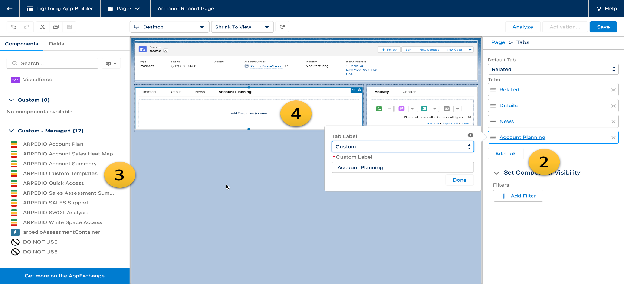
The following components are available:
| Component | Description |
|---|---|
| ARPEDIO Account Plan | Strategic Account Plan |
| ARPEDIO Account Sales Heat Map | Displays assessment scores for the account and its child accounts |
| ARPEDIO Account Summary | Enables export of ARPEDIO data |
| ARPEDIO Custom Templates | Free text fields configured in the ARPEDIO Sales Templates |
| ARPEDIO Quick Access | Shortcut to jump directly into all ARPEDIO components |
| ARPEDIO Assessment Access | The published Sales Assessment template for the record type, giving an indication of account health |
| ARPEDIO SWOT Analysis | SWOT analysis with a built-in confrontation matrix |
| ARPEDIO White Space Access | Access point for the White Space Analysis |
- Click Save.
- Activate the page layout to make the changes visible to users.
Was this article helpful?